You are browsing:

Optimization Tips

Landing Page lessons related to optimizing your page. When you are further with your optimization, kick off the Landing Page Pre-Launch Checklist.

Only A/B test high traffic pages

Hot Tip #57 is to only A/B test high traffic pages.

A/B testing (aka split-testing) with low data will lead to inconclusive and even misleading results.

A more effective use of your time is to optimize and market your primary Landing Page until your traffic increases.

How A/B Testing works - Comprehensive guide by the CXL team where they encourage testing over two business cycles, so it mitigates external events.

Trim the <head> fat

Hot Tip #61 is to trim the <head> fat.

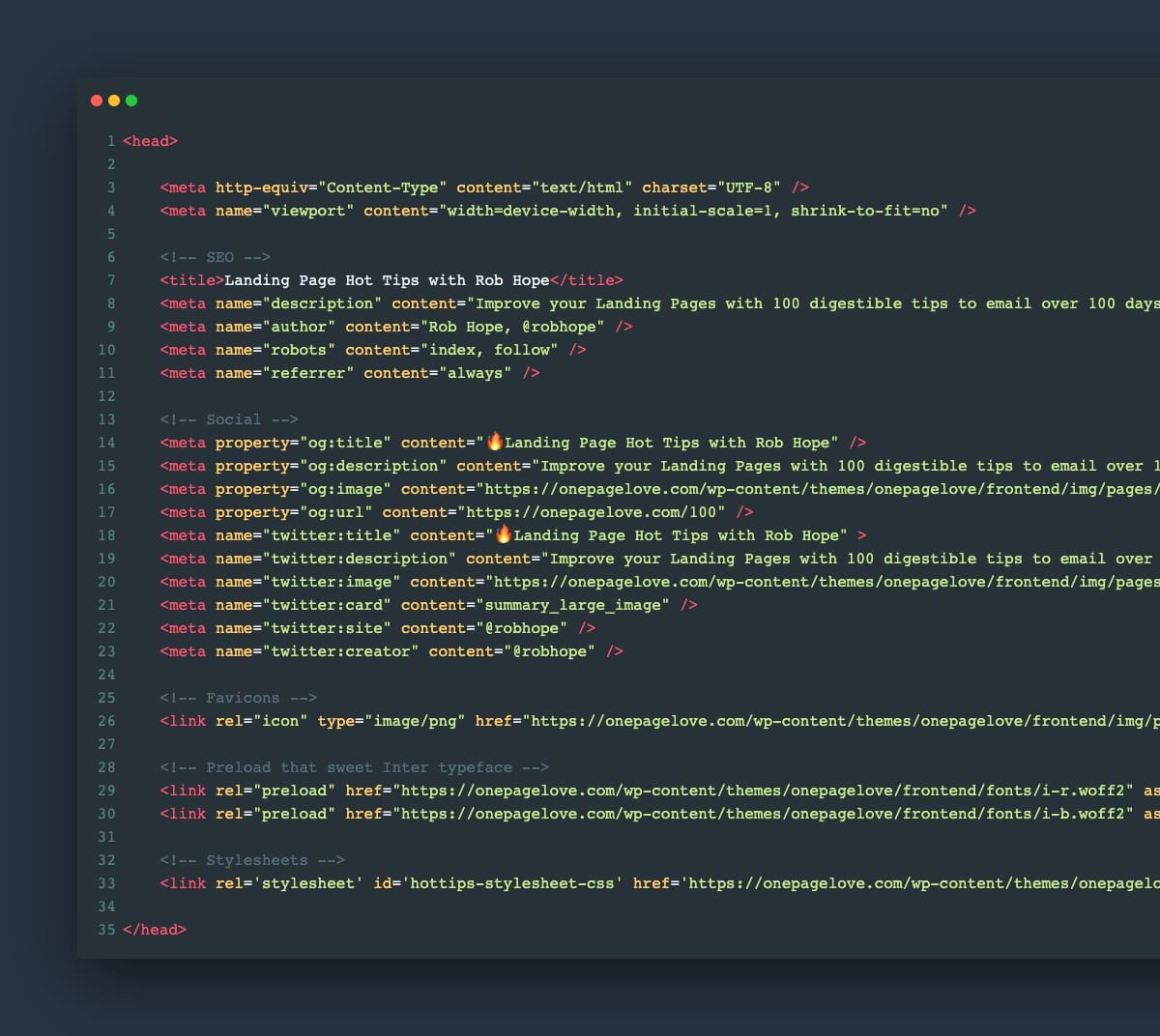
Start by opening up your Landing Page source code view. In Google Chrome: File > View > Developer > View Source. Other browsers will be similar.


Source Code View
Copy all of the code between the opening and closing <head> tag and paste it into a text editor.

Use this checklist, starting from the top:

  • What does this line do?

  • Is it really needed?

  • If not, delete

  • Repeat

This can (and will) uncover scripts, font weights, and code snippets that add nothing but load time to your visitor’s experience.

As tedious as it sounds, your future Landing Pages will benefit from knowing what is behind them.

Make it accessible

Hot Tip #69 is to make it accessible.

Providing people with health conditions or impairments, the ability to read and navigate your Landing Page easily is the right thing to do.

Here are five small tasks that can go a long way:

  1. Create a clear :focus state like this - keep hitting tab on your keyboard and see what happens in your Landing Page.

  2. Ensure your text color contrast isn't weak - this text against this background - has a decent AAA accessibility score of 8.99.

  3. Increase your browser font size and see if your Landing Page layout breaks or anything become illegible.

  4. Correctly assign and order semantic headings (H1, H2, H3) - disabling your stylesheet or using a screen reader will quickly surface issues with your hierarchy.

  5. Describe all your non-decorative images using the alt tag - if an image is only there for graphic purpose you can let the screen reader skip it.

One hour tackling the above, could saves hundreds of frustrating hours for others.

The exercise will also strengthen your Landing Page by surfacing fundamental development issues.

Accessible Color Generator - Useful to find the nearest accessible-passing color based on your color inputs (that are failing).

Contrast for Mac - Great tool I've been using to to ensure my text color hierarchies are within Accessibility standards.

Focus Styles - Solid article by Eric Bailey covering :focus and :active CSS selectors.

Lighthouse - Instructions how to run an accessibility audit for your Landing Page in Google Chrome.

Screen Readers - A curated round-up by UsabilityGeek.

UserWay - A website accessibility solution for ADA & WCAG Compliance. Their widget sits in the corner of the browser where users can customize their browsing experience.

Don't shortcut hosting

Hot Tip #71 is don't take shortcuts on website hosting.

Cheap, shared hosting will end up costing a lot more (through downtime, hacks, sluggish speeds, slow support, and frustrated customers) in comparison to the savings you'd get from using a reputable host.

However, hosting advice is subjective to where you are in your journey. This tip would apply to Landing Pages with a product or service people are buying.

---

Bonus: here are some hosting FAQs and answers I give One Page Love readers who ask. These are actually taken from my email macros I use them so much:)

FAQ: I have a product idea I want to validate but have little budget or coding experience?

Build a free Landing Page online using Carrd. It's free if you keep the name.carrd.co subdomain, then $9/year if you want to use a custom domain.

FAQ: I have a product idea, want to use WordPress but have little budget?

Bluehost is an option if you really want to use WordPress + a free theme. It's not the best hosting but if you are giving away a free product and need to use WordPress, it's your best option. This link discounts to $3/month if you pay annually.

FAQ: I want good hosting for my Landing Page and want to use WordPress?

Flywheel hosts all my WordPress websites and Landing Pages. The uptime is solid, CDN fast, daily backups are great with a 1-click restore, staging for testing convenient and the support is superb. I'm a massive fan. For my network of sites I'm paying $100/month.

FAQ: I want good hosting for my Landing Page and don't want to use WordPress?

If you know your way around a server, Digital Ocean is your best bet at $5/month. I use it for 1 of my Landing Pages.

Focus on people, not search engines

Hot Tip #84 is to focus on people, not search engines.

Organic search traffic to a Landing Page is brilliant, but Google is an unpredictable beast right now.

In recent times, I've even seen some organic search results start on page two. Pretty wild, right?

Focusing all of your energy on copy that resonates with your visitor's problem and delivers a world-class solution is a much smarter play. If you deliver, people will talk about you.

Word of mouth > SEO

Twitter John SEO - for the phrase "blogging platform".

Reinvest your profits

Hot Tip #97 is to reinvest your profits back into your Landing Page.

Once your Landing Page is converting, and you're pleased with your solo optimization efforts, it's time for the specialists to step in.

There are many areas to outsource, but the first I'd recommend is copywriting. Let a copywriter be the officiator that marries your Landing Page tone and your target audience with linguistic flair.

Next would be your imagery. Commission a photoshoot of your product or service in action. We no longer want imagery that's merely good enough, we are looking for imagery that tells a compelling story on its own.

Your mascot illustration, constructed from an illustration kit, can now be designed to include your brand subtleties and visual cues.

Repeat the above throughout your Landing Page and before you know it you'll have a spectacular canvas for your offering.

Test new narratives

Hot Tip #98 is to test new narratives for your offering.

This is probably the most advanced Hot Tip in the series, but one worth doing if you have the traffic and budget.

We hammer on about Landing Page copy resonating with a visitor's specific — singular — problem. But what if your offering solves a few problems really well?

Primary narrative: Your time-tracking software is known for saving freelancers' time by automating their tax returns. Your API was one of the first to integrate with top tax authorities.

So your Landing Page could read: Tired of filling out tax returns? Our software 100% automates the tax return process for you.

Secondary narrative: Your software sends friendly reminder emails to clients with late payments, resulting in more overall cash flow per month.

This Landing Page could read: Losing control of outstanding payments? Our software reminds your clients for you and increases freelancer cash flow by 20%.

Duplicate your primary page, tweak the copy with the secondary narrative, and edit the imagery to spotlight the 'client reminder' emails. Now, set up a new marketing channel to align with the second narrative (late payment) and send them to this new Landing Page.

  • Repeat for a 3rd or 4th Landing Page

  • Assess results

  • Drop the Landing Page with the worst results

  • Increase the budget for the top performers

The above exercise epitomizes the power of Landing Pages.

Make it fast

Hot Tip #99 is to make it fast.

Not only does Google favor fast websites but your visitors will be able to decipher your offering quicker.

Speed through optimization means you've probably also tightened security and trimmed the fat.

When we aim for speed in a Landing Page, everybody wins.

PageSpeed Insights - Popular speed testing tool.

Pingdom Speed Test - My go-to speed testing tool, I prefer the UI over the above.

Start from the beginning, again

Hot Tip #101 is to start from the beginning, again.

  1. Who is your target audience?

  2. What is their problem?

  3. How does your offering solve it?

  4. What do they need to see and read to be persuaded to choose you?

An annual check-in on the above is a healthy exercise to ensure your Landing Page hasn’t strayed from the original goals.

However, industries evolve and businesses need to adapt. This exercise also questions if your Landing Page needs to realign with new goals.

Wishing you the strongest of Landing Pages.